




IOPaint
Free and open-source AI image erasing, restoration, and processing tools
标签:AI Image Tools Object RemovalAI image object removalWhat is IOPaint?
IOPaint is a free and open-source image restoration tool developed by the Chinese developer Sanster Qing, based on the latest artificial intelligence technology. It allows users to edit and improve their images through simple brush strokes, such as image erasure, object replacement, text drawing, and image expansion. Powered by state-of-the-art AI models (such as LaMa, MAT, and Stable Diffusion Inpainting), it utilizes state-of-the-art machine learning techniques to provide high-quality image processing capabilities. IOPaint is licensed under the permissive Apache 2.0 open-source license, allowing users to fully host, modify, and distribute it for commercial purposes.
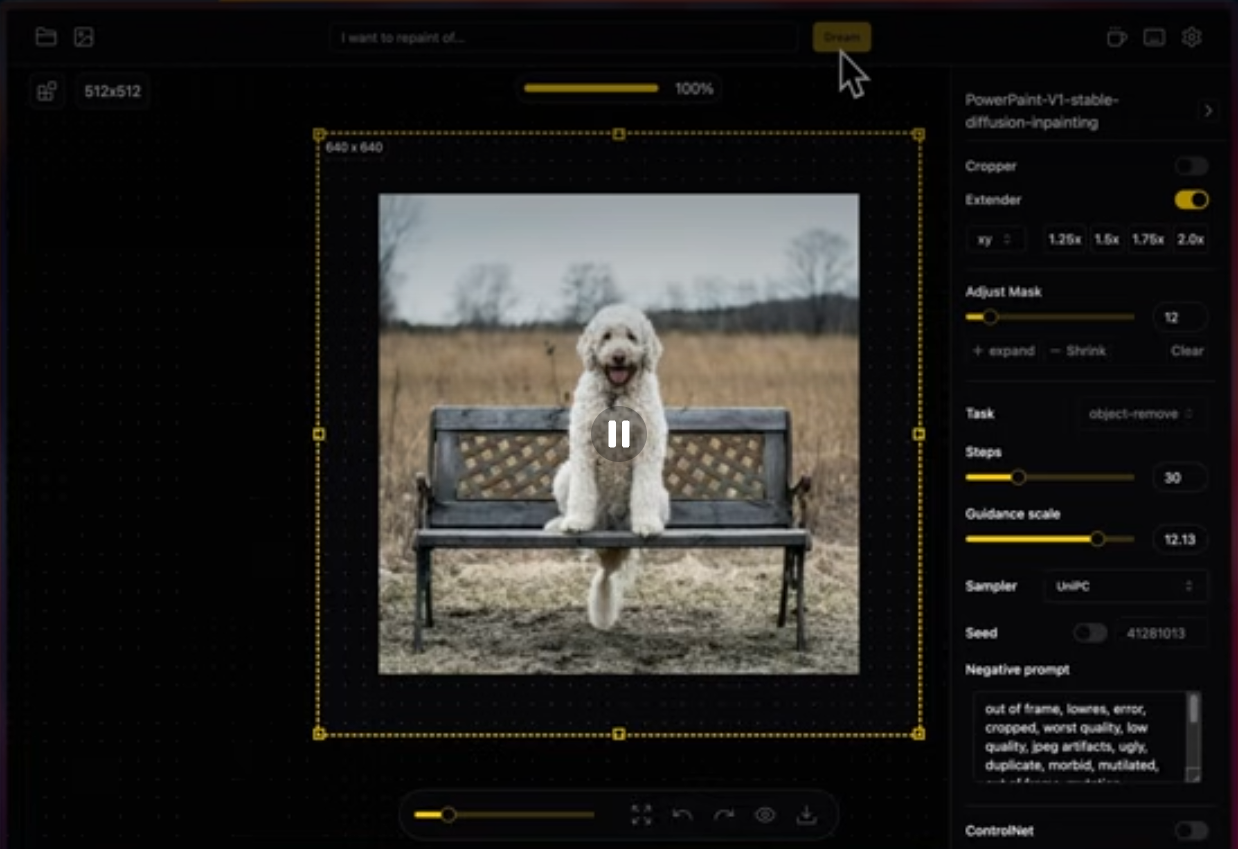
IOPaint’s main functions
- Image Erase : Uses a specific AI model (such as LaMa) to remove unwanted objects, defects, watermarks, or people from images, helping users clean up images to make them look neater or remove unwanted elements.
- Object Replacement : Using an AI model, users can replace an object in an image to change the image content or fix errors.
- Draw Text : Add or edit text on an image. This feature is particularly useful for creating images with descriptions or titles or replacing text in existing images.
- Image out-painting : Expanding the image’s frame boundaries, AI generates new pixels to fill the expanded portion, making the image look natural and seamless.
- Plugin Support : IOPaint supports a variety of plugins that provide additional image processing capabilities, such as:
- Segment Anything : Provides accurate, interactive object segmentation.
- RemoveBG : Removes the background of an image or creates a mask for a foreground object.
- Anime Segmentation : Model training for anime images, used for segmentation.
- Real-ESRGAN : Used for super-resolution image enhancement.
- GFPGAN : Used for facial restoration.
- Batch processing : IOPaint allows users to process images in batches, which can significantly improve efficiency when processing a large number of images.
- Self-hosted and cross-platform : IOPaint is completely free and open source, supports running on a variety of hardware, including CPUs, GPUs, and Apple Silicon, and provides a one-click installer for Windows, making it convenient for users to use on different platforms.
- WebUI Interface : IOPaint provides a clean and easy-to-use web user interface that allows users to access and use these AI models to edit images through a browser.
IOPaint’s official website
- Official website homepage: https://www.iopaint.com/
- GitHub source code repository: https://github.com/Sanster/IOPaint
- Hugging Face Demo: https://huggingface.co/spaces/Sanster/iopaint-lama
- Google Colab runtime address: https://colab.research.google.com/drive/1TKVlDZiE3MIZnAUMpv2t_S4hLr6TUY1d?usp=sharing
- Domestic third-party implementation (Smart Picture): https://vaiui.com/
- Mac version (7-day free trial, $9.99 paid): https://opticlean.io/
- Windows bundled version (requires a $5 fee): https://panicbyte.lemonsqueezy.com/checkout
How to use IOPaint
Method 1: Deploy IOPaint locally
- First, confirm that Python 3 is installed on your computer.
- Open the command line/terminal and use the pip command to install IOPaint:
pip install iopaint - Enter
iopaint startthe command to run IOPaint (add the parameter –model=xxx to switch models). http://127.0.0.1:8080IOPaint can be run by accessing it through a browser .- Upload or drag and drop an image, then you can edit it by painting over it.
Method 2: Run IOPaint online
- Visit IOPaint’s Hugging Face Demo or the domestic third-party implementation Smart Picture.
- Upload or drag and drop the image you want to edit, then use your mouse to paint over it.
In addition, if you want to use the offline version of the software for Windows or Mac, you can consider purchasing the official packaged version. The price is not expensive; you can buy a lifetime version for a few tens of RMB.
相关导航



