




AI AgentAI AgentPlugins And Skills
CC Switch
Open source, cross-platform AI programming configuration management tool
标签:AI Agent Plugins And SkillsPlugins and SkillsWhat is CC Switch?
CC Switch is an open-source, cross-platform AI programming configuration management tool that supports macOS, Windows, and Linux. As a one-stop AI programming tool hub, CC Switch provides unified management of vendor configurations, local routing, usage tracking, Skills synchronization, and cross-application session recovery for seven applications: Claude Code , Claude Desktop , Codex , Gemini CLI , OpenCode , OpenClaw , and Hermes Agent , all within a single interface. It enables integration with third-party models with zero code modification.
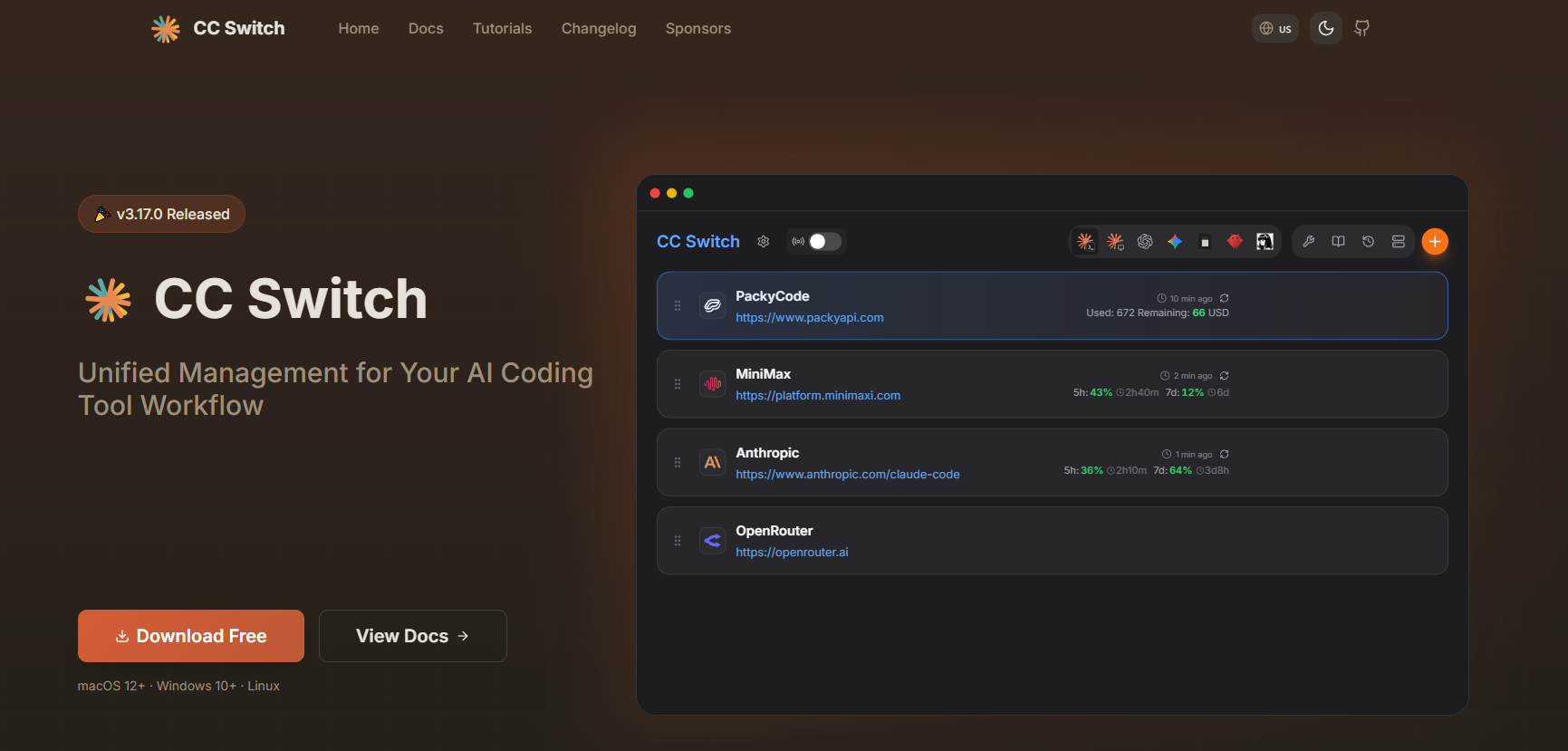
Main functions of CC Switch
- Unified vendor management : A single interface manages the model vendors, authentication information, and API endpoints for seven Agent applications, supporting hot switching and backup recovery.
- Local intelligent routing : Built-in fuse, health monitoring and failover queue, automatically switches to backup node when the main provider fails, without interrupting the workflow.
- Usage and cost tracking : Real-time statistics on request count, token consumption, cache hits, subscription quota and fees, with support for filtering by application and provider.
- Secure local storage : All configurations and API keys are stored in a local SQLite database, supporting full schema migration, and data never leaves the country.
- MCP / Skills / Prompt Management : Unified management of MCP services, Skills packs, Prompts templates, and Hermes Memory, supporting cross-application synchronization and symbolic link deployment.
- Centralized session management : Aggregates local session records from various agents, supporting search, recovery, and deletion, breaking down session silos between applications.
- Model Mapping and Protocol Conversion : Maps Claude official role IDs or Codex GPT model names to actual models from third-party vendors, automatically completing protocol conversion between the Responses API and the Chat Completions API.
How to use CC Switch
- Download and install : Visit the CC Switch official website https://ccswitch.io/ to download the installation package for your system, and launch CC Switch after installation.
- Select the management target : On the main interface, select the Agent application that needs to be managed and activate the toolbar monitoring.
- Add a supplier : Go to the supplier configuration page, fill in the third-party API endpoint address and authentication token, and the system will automatically check connectivity after saving.
- Enable local routing : For applications such as Codex or Claude Desktop, enable the “Require local route mapping” switch to keep the proxy running.
- Configure model mapping : In the mapping settings, specify the name of the third-party model that is actually requested for the Sonnet/Opus/Haiku or GPT series.
- Synchronize Skills : Import existing skill packs or install them from ZIP on the Skills management page, and synchronize them to the configuration directories of each Agent in real time via symbolic links.
- Monitor usage : View real-time request logs, token consumption and cost curves in the usage statistics panel, and set quota alerts.
CC Switch’s core advantages
-
Full application coverage : The industry’s only unified manager that simultaneously supports Claude dual-platform, Codex, Gemini, OpenCode, OpenClaw, and Hermes.
-
Zero-intrusion integration : No need to modify the Agent source code, you can use third-party models simply by pointing the environment variable to the local agent.
-
High-availability routing : Built-in circuit breaking and failover, switching to a backup provider in milliseconds when the main line fails, ensuring development continuity.
-
Cost transparency : Fine-grained usage tracking helps developers identify high-consumption processes, and in practice, it can save about 30% of API expenses.
-
Open source and free : The MIT license is completely open source, with community-driven iteration and no barriers to commercial licensing.
CC Switch project address
- Project website : https://ccswitch.io/
- GitHub repository : https://github.com/farion1231/cc-switch
Comparison of CC Switch with similar products
| Dimension | CC Switch | LiteLLM | ChatWise |
|---|---|---|---|
| Product Form | Cross-platform desktop application (Tauri) | Python backend/proxy service | Cross-platform desktop client |
| Management Scope | 7 major agent applications + local routing | General-purpose LLM API Gateway | Multi-model dialogue client |
| Protocol Conversion | Automatic Responses ↔ Chat Completions | Supports unified interface for 100+ models | Depends on the official client |
| Failover | Built-in fuse + health monitoring + queue | Supports load balancing and fallback | none |
| Skills/MCP | Unified management and cross-application synchronization | You need to configure it yourself. | Partial support for MCP |
| Usage tracking | Two-dimensional statistics by application × Provider | Enterprise-level billing and observation | Basic Token Statistics |
| Open source license | MIT | MIT | Closed-source commercial software |
| Target users | Multi-Agent Heavy Developer | Enterprise-level LLM Operations and Maintenance | Personal AI conversation with users |
Application scenarios of CC Switch
-
Multi-model A/B testing : Developers can quickly compare the code generation effects of models such as Claude, GPT, DeepSeek, and GLM within the same project.
-
Enterprise-grade API disaster recovery : Automatic switching between primary and backup providers avoids development interruptions caused by rate limiting or failure of a single provider.
-
Refined cost control : Team leaders track token consumption by project or member and optimize model call strategies.
-
Skills Asset Accumulation : Centrally manage custom MCP tools and Prompt templates, and synchronize new members to all Agents with one click.
-
Cross-application session continuation : When switching between Claude Code and Codex, the context session is preserved, reducing the cost of repeated communication.
相关导航




ai-navhub:The official website of the AI Toolset includes hundreds of AI tools from both domestic and international sources, as well as commonly used websites, frameworks, and models for AI learning and development, helping you join the wave of artificial intelligence and complete tasks efficiently and automatically!