




AI Design Tools
QuiverAI
What is QuiverAI?
QuiverAI is an AI design tool focused on vector graphics generation. Built on its self-developed Arrow model, it’s a “visual code generation” platform that directly outputs editable SVG code, unlike traditional pixel images. QuiverAI covers four main scenarios: logos, illustrations, fonts, and animations. It provides designers and developers with the ability to generate production-grade vector assets from text or reference images and supports integration into third-party design tools via API and SDK.
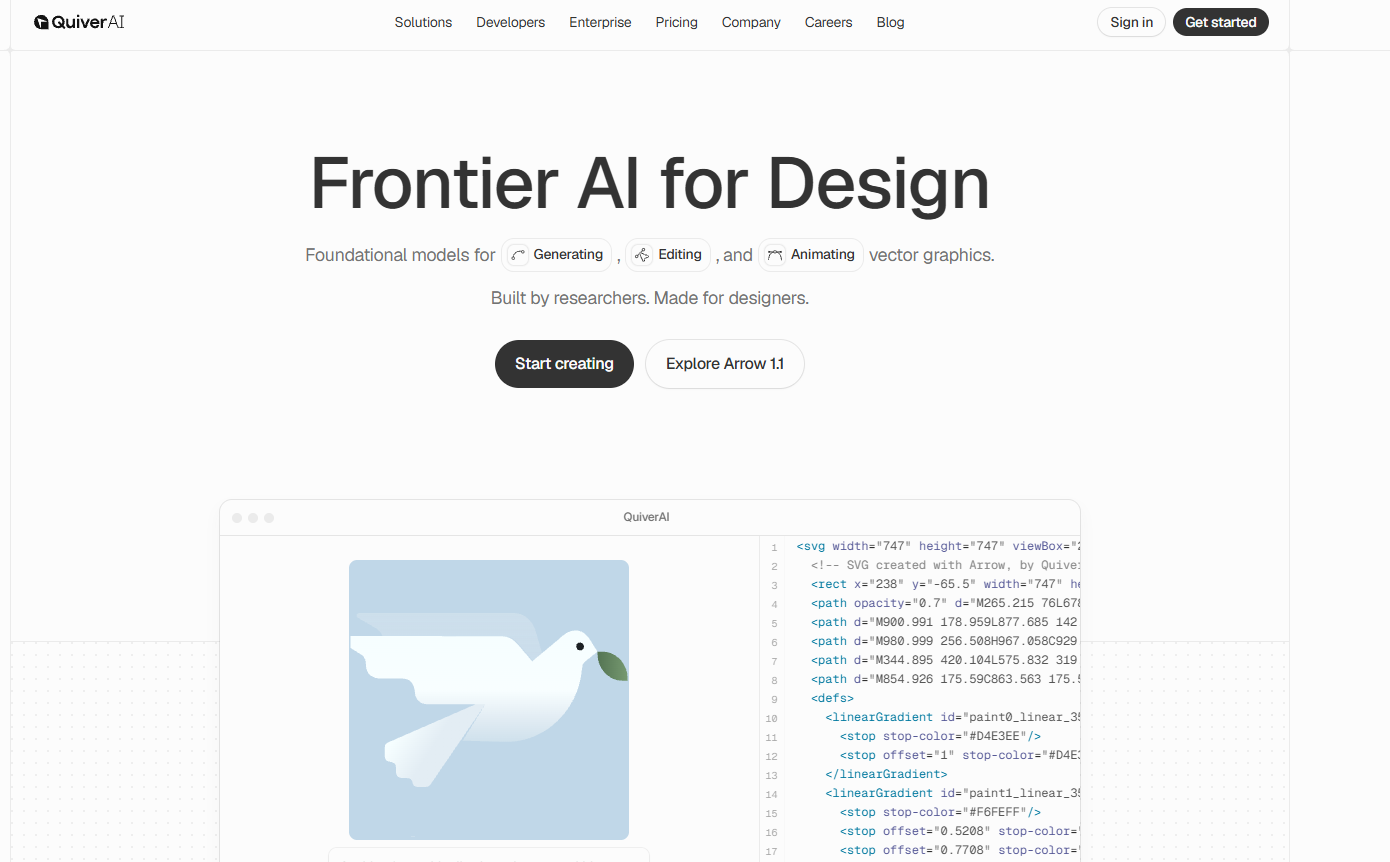
QuiverAI’s main functions
-
Text-to-SVG : Input natural language descriptions to generate vector graphics such as logos, icons, and illustrations, and support stylization commands (such as flat monochrome, rounded corners, and stroke styles).
-
Image to SVG / Smart Vectorization (Image-to-SVG) : Converts raster images such as PNG, JPEG, and WebP into clean, structured SVG code, supporting automatic cropping of the subject
auto_crop. -
Real-time streaming rendering : View the inference, drafts and final product in real time through Server-Sent Events.
-
Multiple format export : Supports exporting in four formats: SVG, PNG, JPEG, and WebP.
-
Natural language iterative editing : After generation, SVG can be finely modified using text commands without manually adjusting the path.
-
Reference image style constraints : Supports up to 4 reference images to guide the output style and composition.
-
High-fidelity mode (Arrow 1.1 Max) : Provides an enhanced model for detail-sensitive scenarios such as complex illustrations and technical drawings.
How to use QuiverAI
-
Register an account : Visit the QuiverAI official website https://quiver.ai/, complete the registration and log in.
-
Choose the generation mode : In the authoring interface, select “Text-to-SVG” or “Image-to-SVG”.
-
Input prompts or upload materials :
-
Wensheng Mode: Enter descriptive prompts, and you can add style instructions.
-
Image-based mode: Upload PNG/JPEG/WebP reference images; optional
auto_crop.
-
-
Configuration parameters : Select the model version (Arrow 1.1 or Arrow 1.1 Max), set the export format, and upload style reference images (up to 4).
-
Generate and Preview : Click Generate to view the output process in real time through streaming rendering.
-
Iterative optimization : Fine-tune colors, shapes, and layouts using natural language instructions.
-
Export or integrate : Download SVG/PNG files, or integrate with your own system via API Key.
Key information and usage requirements for QuiverAI
-
Official website : https://quiver.ai
-
Application entry point : https://app.quiver.ai/creations
-
Documentation Center : https://docs.quiver.ai
-
GitHub : https://github.com/quiverai (provides Node SDK and OpenAPI specifications)
-
API Access : Base URL is [URL]
https://api.quiver.ai/v1, authentication method is [authentication method].Authorization: Bearer <API_KEY> -
Core endpoints :
POST /v1/svgs/generations(Text-to-Graph),POST /v1/svgs/vectorizations(Graph-to-Vector) -
Free quota : The Free plan provides 20 SVG generation quotas per week.
-
Paid plans : Basic ($20/month, 100 images/week), Pro ($40/month, 250 images/week), Enterprise (customized)
-
Usage Requirements : Basic English prompting skills required; API calls require a Node.js or HTTP client environment; Arrow 1.1 Max is recommended for high-fidelity, complex graphics.
QuiverAI’s core advantages
-
Native vector output : Directly generates SVG code instead of pixel images, which can be infinitely scaled and edited layer by layer, seamlessly integrating into professional workflows such as Figma and Illustrator.
-
The structure is extremely clean : the generated path has few control points and a clear hierarchical organization. Even if elements overlap, they remain editable, greatly reducing the cost of manual cleanup later.
-
Leading performance in professional fields : The self-developed Arrow model ranked first on the SVG Arena leaderboard with an Elo score of 1583, making it the first design model to break through 1500 points.
-
Research Team Background : The team consists of researchers in the field of SVG generation AI, who have published cutting-edge papers such as StarVector and RLRF, and have strong technical iteration capabilities.
-
Developer-friendly : Provides a REST API and official Node.js SDK (
@quiverai/sdk), facilitating integration with design tools, font editors (such as Runebender), and automated workflows.
Comparison of QuiverAI’s similar products
| Comparison Dimensions | QuiverAI | Recraft | Adobe Firefly |
|---|---|---|---|
| Core Output | Native SVG vector code | Supports multiple formats including SVG, PNG, and PDF. | Supports SVG, PNG, PSD, etc., and is deeply integrated with the Adobe ecosystem. |
| Generation method | Text-to-SVG, Image-to-SVG | Text-to-Vector, Image-to-Vector | Text-to-Image, Generative Fill, Vector Recoloring |
| Model localization | Focus on the basic vector model (Arrow) | Universal Design AI Platform | Generative AI integrated into Creative Cloud |
| Editing ability | Natural Language Iterative Editing SVG | Provides canvas editing and style control | Native support for in-depth editing in Photoshop/Illustrator |
| Developer Interface | REST API + Node.js SDK | Provides API and plugins | Integration with the Adobe API and plugin ecosystem |
| Pricing Strategy | Free/Basic($20)/Pro($40)/Enterprise | Free quota + paid subscription | Included in Creative Cloud subscriptions or credit purchases |
| Differentiation advantages | Cleanest path, ranked #1 in SVG Arena, research-driven | The community offers a wide variety of templates and features powerful branded suites. | Seamless integration with Adobe workflows and strong enterprise compliance. |
Application Scenarios of QuiverAI
-
Brand Identity System : Rapid exploration and delivery from concept to production-grade SVG Logo.
-
Product interface design : Generate a unified style of icon set, empty state illustrations, and marketing materials.
-
Vectorization of technical drawings : intelligent conversion and refinement of architectural floor plans, fashion design drafts, and engineering drawings.
-
Fonts and Experimental Typography : Create vector letter shapes for custom display fonts or functional UI fonts.
-
SVG Animation Creation : Generate lightweight and controllable vector animations directly for logos, icons, and illustrations (coming soon).
-
Third-party tool integration : As a cloud-based vectorization engine, it is embedded with design plugins, font editors, and automation pipelines.
相关导航




ai-navhub:The official website of the AI Toolset includes hundreds of AI tools from both domestic and international sources, as well as commonly used websites, frameworks, and models for AI learning and development, helping you join the wave of artificial intelligence and complete tasks efficiently and automatically!