




FlowMuse
An infinite canvas focused on AI-powered images and videos.
标签:AI Agent AI Intelligent AgentAI intelligent agentWhat is FlowMuse AI?
FlowMuse AI is an AI content production platform with a “visual workflow canvas” as its core interactive interface. FlowMuse AI abandons fragmented, single-function entry points, encapsulating all AI capabilities into “functional nodes.” Users can automate complex AI invocation processes simply by dragging and connecting nodes on the canvas, completely solving the core problems of fragmented tools, cumbersome operations, and disjointed workflows. It also serves as a “super aggregator” of top models, providing centralized access to mainstream AI models worldwide, eliminating the hassle of multi-platform registration and subscriptions. It is suitable for all content creators, marketing teams, and AI enthusiasts who want to improve AI creation efficiency and automate processes.
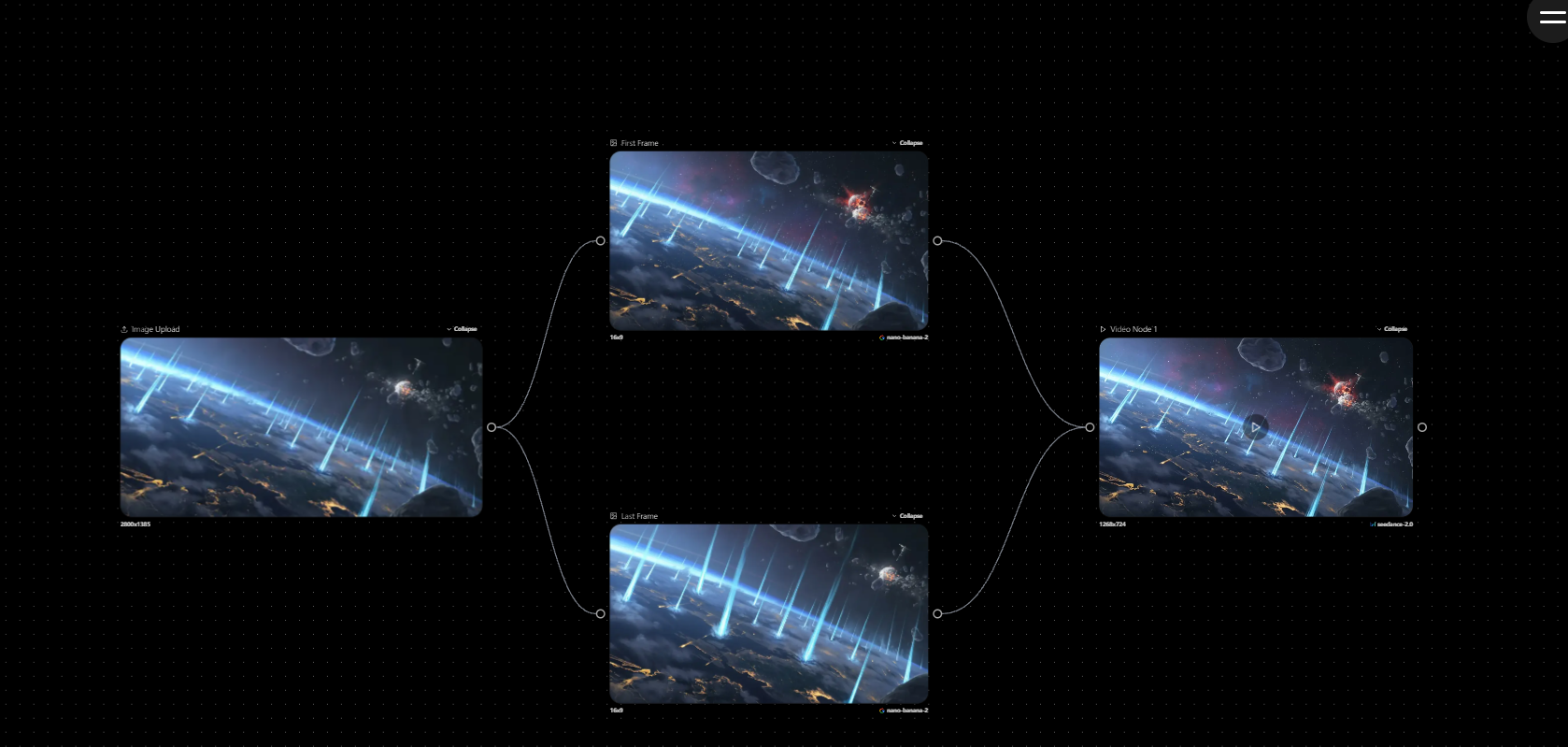
FlowMuse AI’s main functions
- Unified Workflow Canvas: As the platform’s sole interactive interface, users can build and reproduce complex AI task flows simply by dragging and dropping, without writing any code, achieving intuitive WYSIWYG operation.
- Streamline the entire creative process: from brainstorming, prompt generation, and scriptwriting, to image generation, video generation, super-resolution, style unification, and final production and release. Leveraging the capabilities of hundreds of multimodal models worldwide, it provides creators with end-to-end support from idea realization to content production, making every step more efficient, intelligent, and controllable.
- Text Models: The platform supports a variety of top-level models, including the GPT series, Gemini series, Claude series, Grok series, DeepSeek series, Qwen series, etc.
- Image Models: Supports the latest models, such as Google Nano Banana/ Nano Banana 2 ; Google Imagen 4 series; 2 series; Flux.1 Kontext series; Flux 1.1 Pro series; GPT Image 1 series; Dall-E 3; Jimeng 4.0/4.5; Keling Image O1; Tongyi Qianwen Qwen-Image series; Midjourney series; Grok Image; Ideogram series; Recraft series; Stable Diffusion series, etc.
- Video Models: Supports top-tier video models, including OpenAI Sora 2/2 Pro; Google Veo3 series; Runway Gen4 series; Tongyi Wanxiang 2/2.5 series; Jimeng Seedance V1 series; Keling 2.1/2.5/2.6/O1 series; Hailuo 02/2.3 series; Grok Imagine ; Vidu Q2/2.0 series.
- Audio models supported include Suno V5; Minimax series; OpenAI TTS series; and ElevenLabs series.
How to use FlowMuse AI
- Access the platform: Visit the FlowMuse AI official website https://flowmuse.ai, register and log in.
- Create a project: Click “Create New Project Now” to open a new canvas.
- Features include: 9 built-in simple modules, including image generation, image editing, image parsing, audio generation, audio editing, audio parsing, video generation, image-to-video, video editing, video parsing, and large model creation. You can also double-click the canvas to create new nodes and customize your workflow.
- Start creating: Enter your prompt word in the prompt word node, or upload your materials according to the prompt, and click the lightning bolt button to start generating.
- Image processing: You can perform the following on uploaded or generated images: image quality enhancement, one-click background removal, intelligent image expansion, local redrawing, and image analysis.
- Video processing: You can perform the following on uploaded or generated videos: image quality enhancement, spin frame extraction, watermark removal, video extension, and video parsing.
- Resource integration: The left toolbar has a built-in mini CapCut, which allows you to edit all generated materials.
- Share: After you finish creating your artwork, you can share your canvas/creation process using the share button in the toolbar.
- Automated execution: Creating workflows is not a one-time task. Our automated execution system intelligently repeats operations to create unique solutions tailored to your needs.
FlowMuse AI’s product pricing
- Pay-as-you-go: Complete new user tasks to earn up to 900 points, and subsequent top-ups of $1 = 100 points.
- Trial version: 800 points per month, 5 concurrent executions, up to 400 images or up to 8000 seconds of video.
- Creator Edition: 3000 points per month, 10 concurrent executions, up to 1500 image generation or up to 3000 seconds of video.
- Professional version: 6500 points per month, 20 concurrent executions, up to 3250 image generation or up to 6500 seconds of video.
- Flagship Edition: 14,000 points per month, unlimited concurrency, up to 7,000 image generation or up to 14,000 seconds of video.
Even after the highest discount, the model price is still lower than the official price, and all points never expire.
Application scenarios of FlowMuse AI
- E-commerce Marketing: Based on an exclusive 8K ultra-high-definition image node and workflow batch execution system, it can generate high-precision and high-quality product images and marketing materials with one click, realizing the automation of e-commerce workflow.
- Short video creation: Integrating top-tier models such as Sora 2, and through the built-in editor, it provides a one-stop closed loop for creation, from scripting and generation to final delivery, enabling efficient production of creative short films.
- Digital Human Applications: Enables single-image customization, quickly creating realistic voiceovers and marketing videos, suitable for news and paid knowledge scenarios.
- Image Enhancement: Using intelligent processing nodes, low-resolution images or video footage can be upgraded to 4K/8K resolution with one click, repairing old images or optimizing footage details.
- Complex task flow: Hundreds of top global models can be freely linked through a visual canvas to achieve complex AI task flows without the need for coding.
相关导航



