




What is Devin Desktop?
Devin Desktop (formerly Windsurf) is a next-generation AI development platform from Cognition, a comprehensive upgrade of the Windsurf IDE, positioned as an “Agent Command Center.” While retaining full IDE capabilities, it uses Kanban to centrally manage all local and cloud agents and introduces Spaces to enable cross-agent context sharing. The platform supports the ACP open protocol and is compatible with third-party agents such as Codex and Claude Agent, achieving a unified end-to-end experience from desktop to cloud and CLI to code review.
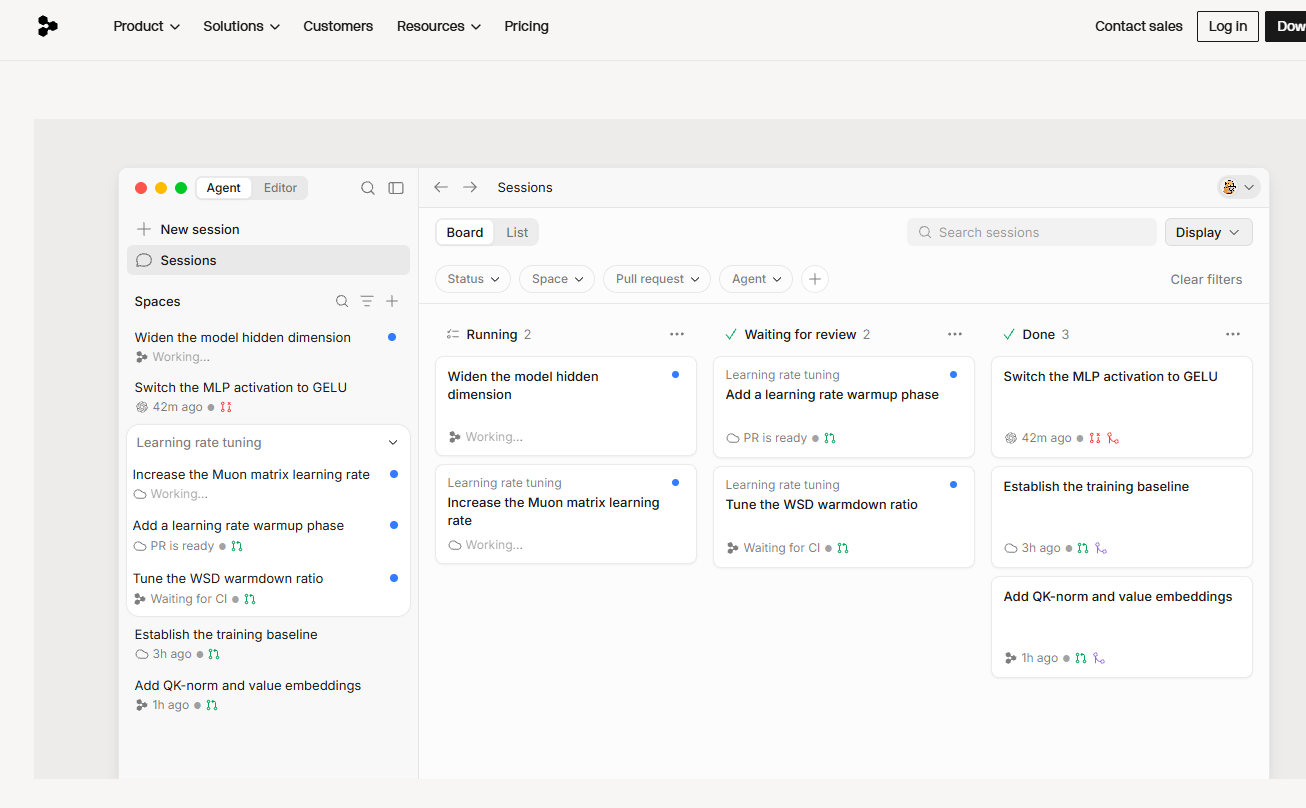
Main functions of Devin Desktop
- One-click deployment (Deploys) : Windsurf now supports one-click deployment of applications to the public internet. Users can simply click to package and publish their locally developed applications to the public internet, and the deployed URL can remain unchanged for easy future updates.
- Enhanced features for enterprise users : MCP and Turbo modes. Enterprise users can use features such as MCP (Model Context Protocol) and Turbo mode. Administrators can control the on/off state of these features in the background, and manage content including allowed models, MCP and Turbo modes, etc.
- Automatically generate commit messages : Windsurf can generate commit messages with one click, automatically generating descriptions based on the current code changes. Users can edit and modify these descriptions in the SCM sidebar of Windsurf before committing them to Git.
- Chat history directory navigation : A chat directory has been added to the top left corner, making it easier for users to quickly jump to or scroll back to previous conversations in long conversations, solving the problem of inconvenience in finding conversation content after going off-topic in long conversations.
- Long conversation performance improvements : The official team has optimized the performance of long conversations by using techniques such as checkpoints and summarization to ensure that the quality of responses is maintained as much as possible in long conversations.
- Tab functionality improvements : The tab functionality continues to evolve, adding context for user searches, supporting the use of the tab function in Jupyter Notebook, and making tab navigation faster and further.
- Multi-model AI integration : Windsurf integrates multiple AI models, such as code generation, error detection, and refactoring suggestions. These models work closely together to provide developers with comprehensive programming support.
- Flows Mode : Flows is a core innovation of Windsurf. It introduces a brand-new collaborative intelligent agent called Flow, which can capture and respond to developers’ actions in real time and provide accurate code suggestions.
- Code auto-completion : Provides intelligent code completion suggestions based on context, including variable names, function names, class names, etc.
- Error detection and repair : Detects potential errors in the code in real time and provides repair suggestions.
- Supercomplete : An advanced prediction system that analyzes and suggests the next steps beyond simple code completion, improving developer productivity.
-
Agent Command Center : Manage the tasks and status of all local and cloud agents in a unified manner through a Kanban dashboard view.
-
Spaces : Share contexts between agents and manage session, PR, file, and project contexts in groups.
-
ACP Protocol Compatibility : Supports Agent Client Protocol and can be integrated with Codex, Claude Agent, OpenCode, and team-built agents.
-
Devin Local : A Rust-rewritten local agent that saves 30% of tokens compared to Cascade and supports sub-agent capabilities.
-
Unified coverage across the entire stack : Desktop, Cloud, CLI, and Review are all unified, with the same Agent and the same context.
Devin Desktop official website address
- Official website : codeium.com/windsurf
Application scenarios of Devin Desktop
- Large codebase management : In large projects, developers can understand and navigate complex codebases, enabling efficient code editing and maintenance.
- Code development and refactoring : Developers generate new code, refactor existing code, and optimize code structure.
- Problem detection and debugging : With Cascade’s problem detection and debugging features, developers can quickly locate and fix problems in their code, improving development efficiency.
- Multi-file editing and collaboration : In projects where multiple files or modules need to be edited simultaneously, this feature helps developers maintain contextual consistency and improve collaboration efficiency.
- Rapid prototyping : For developers who need to iterate prototypes quickly, it accelerates the development process and reduces coding time.
相关导航






ai-navhub:The official website of the AI Toolset includes hundreds of AI tools from both domestic and international sources, as well as commonly used websites, frameworks, and models for AI learning and development, helping you join the wave of artificial intelligence and complete tasks efficiently and automatically!