




AI Development Platform
Label Studio
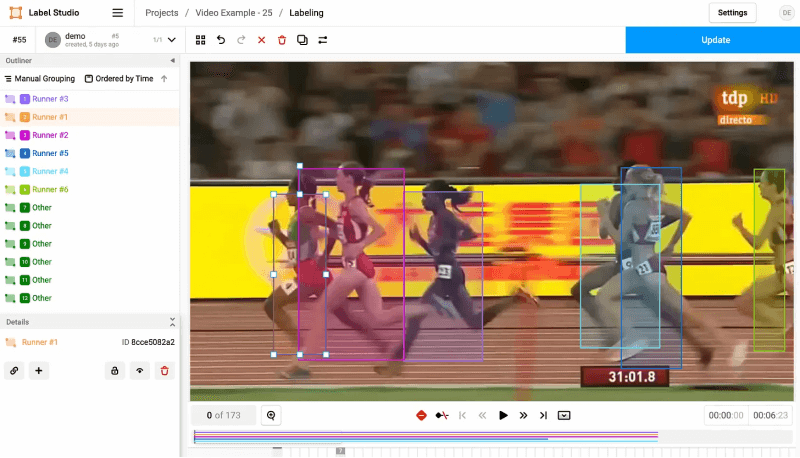
Label Studio is a free and open-source data annotation tool developed by Human Signal (formerly Heartex). The project has nearly 14,000 stars on GitHub and can help developers fine-tune large language models, prepare training data, or validate AI models.
Label Studio Features
- It supports tagging various data types, including images, audio, text, time series, multi-domain data, and video.
- Flexible and configurable, with customizable layouts and templates to suit your datasets and workflows.
- Machine learning-assisted labeling uses predictions integrated into the ML backend to assist the labeling process, thereby saving time.
- Multiple projects and users, supporting multiple projects, use cases, and data types on a single platform.
- Integrates with your ML/AI pipeline, enabling authentication, project creation, task import, model prediction management, and more using webhooks, the Python SDK, and API.
How to get started with Label Studio
libq-devFirst, confirm that the necessary installation andpython3-devdependencies are complete on your computer.- Then use
pip install label-studiothe command to install Label Studio. label-studio startLaunch Label Studio from the terminal/command line.- Open the Label Studio UI via http://localhost:8080
- Register using your own created email address and password.
- Click Create to create a project and begin tagging data.
- To name your project, you can enter a project description and select a color.
- Click Data Import and upload the data file you want to use. If you want to use data from a local directory, cloud storage, or database, you can skip this step for now.
- Click on Labeling Setup and select a template, then customize the label name according to your use case.
- Click Save to save your project.
For more settings and related operations, please refer to the official documentation : https://labelstud.io/guide/get_started.html
相关导航








ai-navhub:The official website of the AI Toolset includes hundreds of AI tools from both domestic and international sources, as well as commonly used websites, frameworks, and models for AI learning and development, helping you join the wave of artificial intelligence and complete tasks efficiently and automatically!