




AI Design Tools
Open Design
What is Open Design?
Open Design is an open-source, locally-first AI design workspace positioned as an alternative to Claude Design . It doesn’t bundle an AI model; instead, it directly utilizes over 21 existing programming agents on your computer, such as Claude Code , Cursor , Kimi, and Codex , driving workflows through the SKILL.md skill and the DESIGN.md design system. It allows for a complete closed loop on your desktop, from requirements definition and visual direction selection to deliverables and reviews, outputting web prototypes, dashboards, presentations, images, and videos, exported as HTML, PDF, PPTX, or MP4.
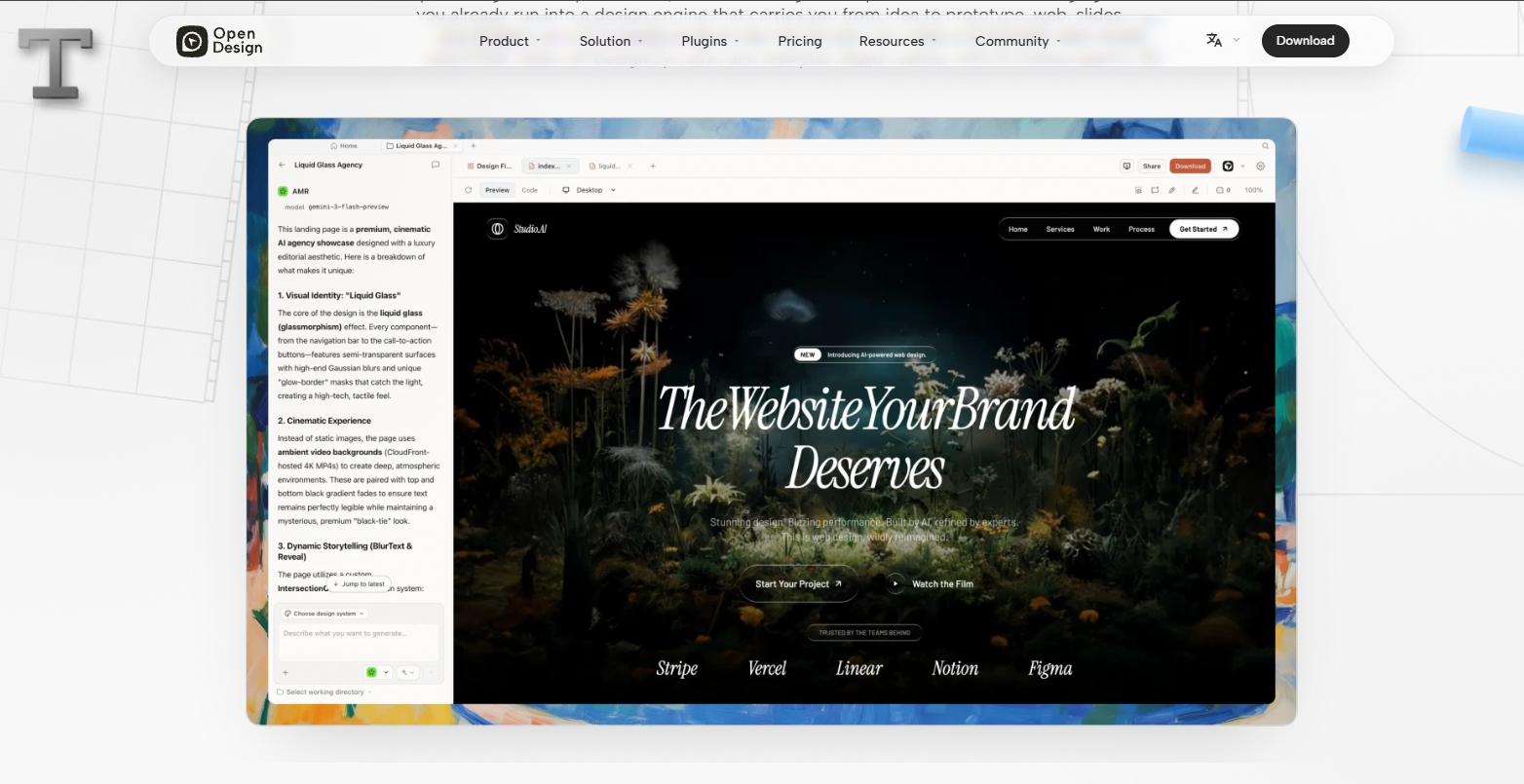
Main functions of Open Design
-
Open source local priority : Apache-2.0 license, it is an open source alternative to Claude Design, with all data stored locally, without relying on a single vendor’s cloud service.
-
Native Agent Driver : Supports 21+ programming agents (Claude Code, Cursor, Kimi, Codex, Gemini, Copilot, DeepSeek, etc.), with one-click access via the MCP protocol.
-
Skills System : Includes 259+
SKILL.mdreusable design skills based on [specific framework/mechanism], which can be loaded by dragging and dropping into a folder and directly read and executed by the Agent. -
Design System : Offers 142+ brand-level
DESIGN.mddesign systems (Linear, Stripe, Apple, Vercel, etc.), and supports uploading screenshots or Figma files to automatically extract brand guidelines. -
Multi-format output : It can generate web prototypes, real-time dashboards, presentations (Decks), images, videos, and HyperFrames dynamic graphics.
-
Multi-format export : The output supports exporting to formats that can be directly used in the project, such as HTML, PDF, PPTX, and MP4.
-
BYOK supports : Built-in API Key, compatible with any endpoint such as OpenAI, Anthropic, Google, Moonshot, OpenRouter, and self-hosted vLLM.
-
The four-step design loop is : Detect (automatic agent detection) → Discover (30-second requirements questionnaire) → Direct (locking visual direction) → Deliver (streaming generation and preview).
How to use Open Design
-
Download and install : Visit the Open Design website https://open-design.ai/ to download the desktop application (macOS/Windows), or clone the source code and
github.com/nexu-io/open-designinstall using Node 24 + pnpm, ordocker compose updeploy with one click. -
Connect the programming agent : After installation, run the program
od mcp install <agent>to connect your local agent (Claude Code, Cursor, Kimi, Codex, etc. 21+) to the Open Design MCP server with one click. -
Start the daemon process : After opening the application, the daemon process automatically scans for
$PATHagents in the application and loads 259+ skills and 142+ design systems. -
Create a project : On the Home page, select the product type (prototype, dashboard, presentation, image, video, etc.) and bind a
DESIGN.mddesign system (such as Stripe, Apple Style, or a custom brand). -
Identify requirements : Answer a 30-second questionnaire (purpose, target audience, tone, scale, brand background) to quickly align design direction.
-
Choose a visual direction : Select from 5 deterministic visual schemes, and the system will automatically lock the OKLch color palette, font stack, and layout posture.
-
Generation and Preview : The Agent writes the output to the local disk and previews the real CSS rendering effect in real time in a sandbox iframe.
-
Review and Iteration : The product is critically optimized through a built-in 5-dimensional self-evaluation system (philosophy, hierarchy, execution, specificity, and restraint).
-
Export deliverables : After confirmation, export as HTML, PDF, PPTX, MP4, or ZIP. The deliverables will remain directly in your project directory.
Open Design’s core advantages
-
Completely open source and free : Apache-2.0 license, no subscription fee, freely forkable and self-hostable.
-
Local priority, data autonomy : All product and project data are stored in the local file system, without going through the vendor’s cloud, ensuring privacy control.
-
Agent-agnostic and freely switchable : Supports 21+ programming agents (Claude, Cursor, Kimi, Codex, etc.), skills and systems are not bound to specific models, and changing an agent only requires changing one line of configuration.
-
BYOK cost control : Comes with an API Key, pays directly to the selected provider, with no middleman commission, and supports OpenRouter and self-hosted models.
-
File as a Design System : A declarative file system based on
SKILL.mdandDESIGN.md, where skills and design systems are reusable, version-manageable, and shareable across teams. -
Real code rendering : The output is real CSS, real fonts and real components, not canvas pixels, and the output can be directly entered into the engineering process.
-
One-click output in multiple formats : The same design system can generate web prototypes, dashboards, PPTs, images, videos and HyperFrames in a streaming manner.
-
Zero-cost brand migration : Upload screenshots or export files from Figma, the Agent will automatically extract
DESIGN.mdthe brand’s specifications, and all subsequent skills will automatically apply the brand’s guidelines.
Comparison of Open Design’s similar products
| Comparison Dimensions | Open Design | Claude Design | Open CoDesign |
|---|---|---|---|
| Developer | nexu-io community | Anthropic Labs | OpenCoworkAI |
| Product Positioning | Open source, local-first AI design workspace | Cloud-based AI design tools for generating visual products from text | Open-source desktop AI design tool, Prompt-to-Artifact |
| Open source license | Apache 2.0 | Closed-source commercial products | MIT |
| Deployment method | Local desktop application / source code / Docker | Cloud-based SaaS (claude.ai/design) | Local desktop applications (Electron) / Homebrew / winget |
| Underlying Model | 21+ types of local programming agents (Claude, Cursor, Kimi, Codex, Gemini, Copilot, DeepSeek, etc.) | Claude Opus 4.7 only | Claude, GPT, Gemini, DeepSeek, Kimi, GLM, Ollama, OpenRouter, SiliconFlow, etc. |
| Product type | Web prototypes, dashboards, presentations, images, videos, HyperFrames | Interactive prototypes, slideshows, wireframes, marketing materials, flyers | HTML prototypes, React/JSX components, slideshows, PDFs, marketing materials |
| Design System | 142+ DESIGN.md+ 259+ SKILL.md, supports automatic extraction of brand specifications from screenshots/Figma. |
Automatically read code repositories and design files to extract design tokens | DESIGN.md+ 12+ Built-in design skills (YAML), extensible |
| Code export | HTML, PDF, PPTX, MP4, ZIP, Markdown | PDF, PPTX, standalone HTML, Canva, Claude Code handover | HTML, PDF, PPTX, ZIP, Markdown |
| Pricing Model | Free and open source, BYOK (pay for API fees yourself) | Bind your Claude subscription (starting at Pro $20/month) to consume your messaging quota. | Free and open source, BYOK (pay for API fees yourself) |
| Data privacy | Local priority, data is stored in the local file system. | Cloud processing, data resides on Anthropic servers | Local priority, data is stored locally in SQLite |
| Offline capabilities | Yes (via local Agent/Ollama) | no | Yes (via Ollam) |
Application scenarios of Open Design
-
Rapid product prototyping : Using 259+ skills and 142+ design systems, quickly generate high-fidelity interactive prototypes for web, desktop, or mobile devices through natural language descriptions. Realistic CSS rendering allows for direct use in development handover.
-
Brand visual system construction and migration : Upload brand screenshots or Figma exported files, the Agent automatically extracts them
DESIGN.md, establishes reusable brand specifications, and ensures visual consistency of all deliverables (prototypes, PPTs, images). -
Presentation and Proposal Creation : Use Magazine Decks skills to generate editor-quality slides, supporting WebGL animations and magazine layouts, and export PPTX or PDF for client presentations and fundraising roadshows.
-
Marketing materials and multimedia content generation : Generate images, videos, and HyperFrames motion graphics using Synthetic Matter skills, and complete the output from text to visuals in a unified chat interface.
-
Real-time data dashboard setup : Generate interactive Live Artifacts, connect to real data sources to build internal monitoring panels, operational dashboards, or SaaS backend interface prototypes.
-
Design system standardization and team collaboration : Store the team’s files
DESIGN.mdandSKILL.mdoutputs in a shared repository, and all members drive outputs through the same set of files, achieving version control of design specifications.
相关导航




ai-navhub:The official website of the AI Toolset includes hundreds of AI tools from both domestic and international sources, as well as commonly used websites, frameworks, and models for AI learning and development, helping you join the wave of artificial intelligence and complete tasks efficiently and automatically!