






AI Prompts
MeiGen
What is MeiGen?
MeiGen is a community gallery and one-click generation platform focusing on AI prompts. It aggregates high-quality prompts from mainstream models such as GPT Image 2, Nano Banana 2 , Seedance 2.0, Veo 3.1, and Midjourney. Users don’t need to master complex prompt engineering; simply browse community works, copy the prompt, and instantly call the corresponding model to generate similar images or videos. The platform covers diverse styles including 3D figurines, clay aesthetics, movie posters, realistic portraits, and advertising design. It also supports creation modes such as image-to-image and video remix, making it an efficient tool for AI visual creators to gain inspiration and quickly reproduce viral works.
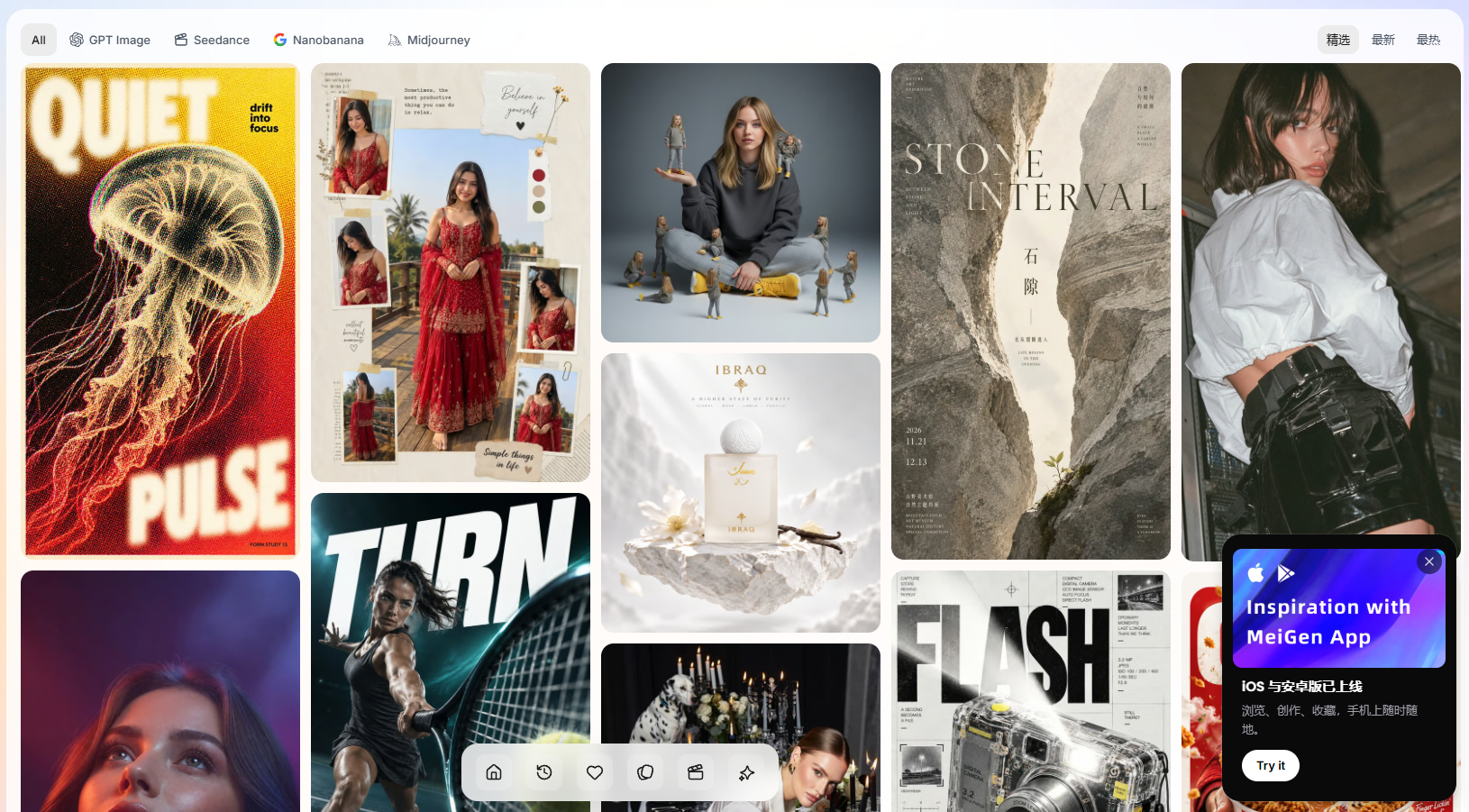
MeiGen’s main functions
-
A vast gallery of cue words : featuring carefully selected cue words from models such as GPT Image 2, Nano Banana 2, Seedance 2.0, Veo 3.1, and Midjourney, categorized by style and theme.
-
One-click copy generation : When browsing any work, you can directly copy the complete prompt words and seamlessly connect them to the target model for reproduction without manually disassembling the prompt word structure.
-
Multi-model compatibility : The same prompt word can be generated by different backend models, allowing for comparison of the performance differences of each model under the same semantics.
-
Image upload and style transfer : Supports uploading reference images and performing style conversion based on prompts (such as converting photos to black and white line art, or realistic figures to 3D figurines).
-
Video prompts section : Provides complete prompts and previews of generated effects for video models such as Seedance 2.0, and supports secondary creation with Remix.
-
Community interaction system : Works support likes, view count statistics and author homepage display, forming a closed-loop ecosystem for prompt word creation and sharing.
-
Prompt-free engineering : The platform is positioned as “no prompt engineering needed,” lowering the barrier to AI creation for non-technical users.
How to use MeiGen
-
Visit the gallery : Open the MeiGen website https://www.meigen.ai/ and browse the Featured AI Image Prompts or Seedance 2.0 video prompts recommended on the homepage.
-
Filter by style : Click on the works you are interested in according to your needs (such as “3D figurine style stamps”, “commercial advertising posters”, “black and white line drawings”, etc.).
-
View Prompt : Go to the project details page to view the complete English Prompt and the target model used.
-
One-click copy : Click the copy button to get the complete prompt text.
-
To generate a model , paste the prompt into the generation interface of the corresponding model (GPT Image 2, Midjourney, Nano Banana, etc.) or run it directly in the generation entry associated with MeiGen.
-
Advanced Image Creation : If you need to transfer your style, upload your own reference image and combine it with the copied prompts to create an image.
-
Video Remix : In the video cue section, modify keywords based on existing Seedance 2.0 cue words to generate personalized videos.
MeiGen’s core advantages
-
Reproduce viral hits with zero barriers : Highly praised works from the community come with complete prompts, allowing even beginners to quickly produce professional-grade AI images/videos.
-
Comprehensive model coverage : From OpenAI GPT Image 2 to ByteSeedance 2.0, providing a one-stop comparison of the style differences of mainstream generative models.
-
Inspiration is productivity : Browsing galleries is itself a process of finding inspiration. You can directly copy styles you like, saving time from repeatedly adjusting prompts.
-
The range of styles is extremely wide : it covers dozens of visual styles, including 3D figurines, clay aesthetics, movie posters, commercials, realistic portraits, and anime line art.
-
Dual Tracks for Video and Images : Supports both static image prompts and dynamic video prompts, meeting the dual needs of graphic design and short video creation.
-
Community-driven updates : Prompt words are continuously contributed by creators worldwide, and gallery content is updated frequently to keep pace with the AI model’s iteration rhythm.
Comparison of MeiGen’s similar products
| Comparison Dimensions | MeiGen | PromptHero | Civitai |
|---|---|---|---|
| Core positioning | AI-powered word suggestion gallery + one-click reproduction | Prompt keyword search engine + model library | Stable Diffusion Model / LoRA Community |
| Support Model | GPT Image 2, Nano Banana, Midjourney, Seedance, Veo, etc. | Midjourney, Stable Diffusion, DALL·E, etc. | Based on the Stable Diffusion ecosystem |
| Content Format | Prompt words + generated effect image + video preview | Prompt words + generated image + model file | Model file + generated graph + prompt words |
| Usage threshold | Extremely low, just copy the prompt word. | Medium difficulty, requires self-configuration of the model environment. | High requirements; requires local deployment or cloud-based SD configuration. |
| Community attributes | Lightweight interaction (likes, views, author page) | Search and bookmarking are the main methods. | A dedicated community (model downloads, ratings, discussion forums) |
| Video support | Supports Seedance 2.0 and Veo 3.1 video prompts. | less | A small number of video models |
| Business Model | Free browsing + Paid related models | Free + Premium Search Subscription | Free + Creator donations/membership |
MeiGen application scenarios
-
Social media visual production : Quickly generate 3D figurine avatars, clay-style selfies, and touching movie portraits in the style of Xiaohongshu/Instagram.
-
Commercial poster design : Based on the slogans of highly-rated advertising posters in the community, replicate and replace brand elements to produce e-commerce detail pages and product posters.
-
Short video material generation : Use Seedance 2.0 video prompts to generate dynamic intros, product display videos, and AI animation clips with one click.
-
IP and Character Design : Utilize specific prompts such as “3D figurine styles” and “clay aesthetics” to quickly generate character prototypes and related visual elements.
-
Style transfer and secondary creation : Upload personal photos and use prompts such as “photo to black and white line drawing” and “photo to 3D figure” to achieve stylistic transformation.
-
AI Teaching and Training : As a prompt word case library, it is used to demonstrate to trainees the impact of different models and different prompt word structures on the generation effect.
相关导航


ai-navhub:The official website of the AI Toolset includes hundreds of AI tools from both domestic and international sources, as well as commonly used websites, frameworks, and models for AI learning and development, helping you join the wave of artificial intelligence and complete tasks efficiently and automatically!