




AI AgentAI AgentPlugins And Skills
agent-browser
What is agent-browser?
agent-browser is a browser automation CLI tool for AI agents developed by Vercel Labs. Written in native Rust, it directly controls the real Chrome browser based on the Chrome DevTools Protocol (CDP). Through a compact accessibility tree snapshot and ref reference mechanism, the tool provides LLMs with context-efficient web page interaction capabilities, supporting 50+ browser operation commands, multi-session isolation, cloud browser integration, and a real-time observability dashboard.
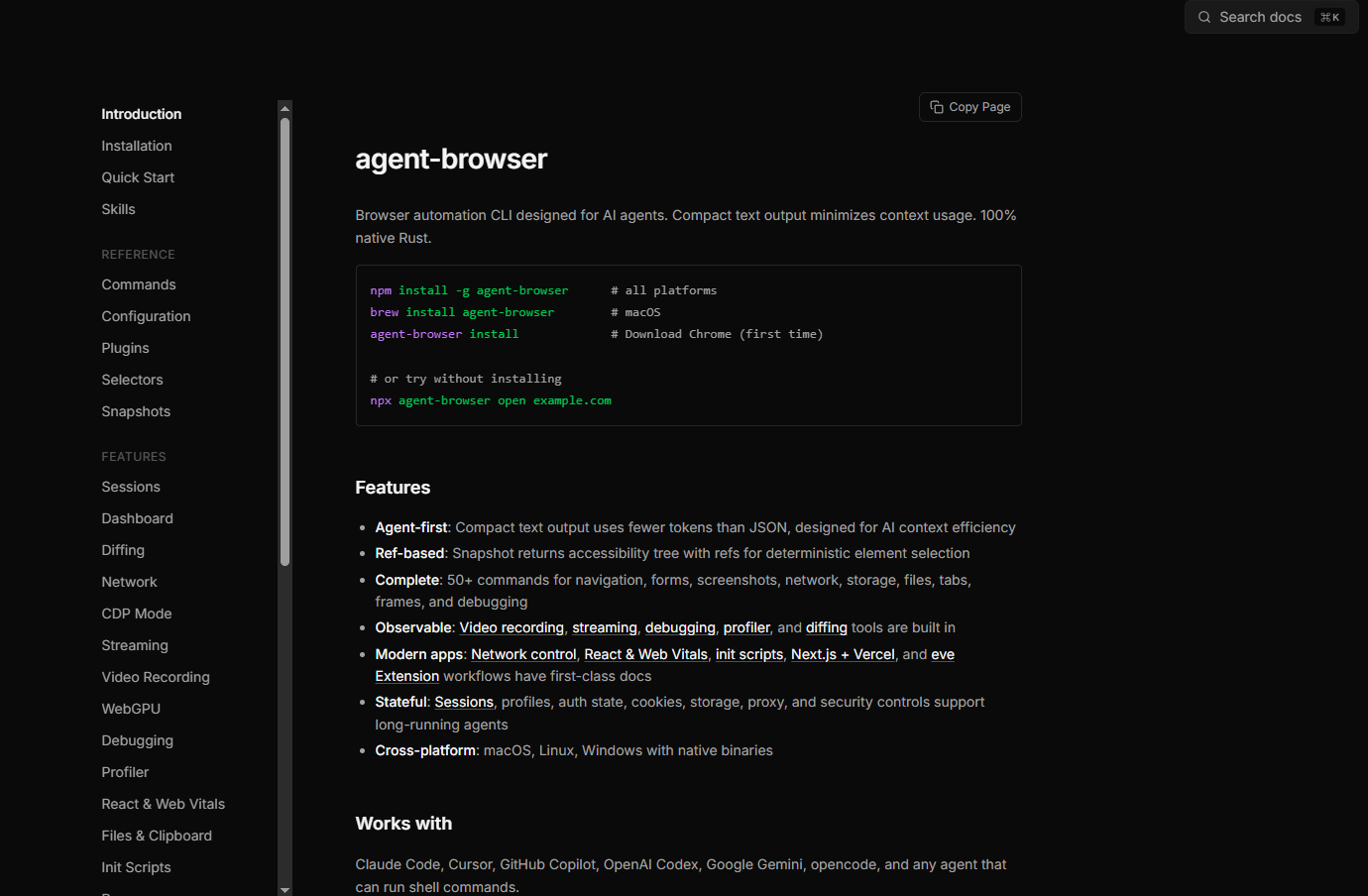
The main functions of agent-browser
-
Snapshot Accessibility Tree Crawler : Outputs a compact, accessible tree structure for web pages, along with deterministic references such as `<ref>
@e1` , for AI to accurately locate elements.@e2 -
Ref-driven interaction : Perform operations such as clicking, filling, scrolling, and taking screenshots based on the Ref reference returned by the Snapshot, without repeatedly querying the DOM.
-
50+ browser operation commands : covering complete browser control capabilities including navigation, forms, mouse, keyboard, clipboard, network blocking, tab management, PDF export, etc.
-
Semantic element location : Supports finding and manipulating elements using semantic methods such as ARIA roles, text content, tags, placeholders, and alt text.
-
Multi-session isolation : Supports multiple instances of browser sessions running in parallel, each with its own independent cookies, storage, authentication, and navigation history.
-
Network monitoring and interception : It can intercept, block, and mock network requests, and supports HAR recording and filtering of requests by resource type, status code, and method.
-
Screenshot and Visual Diff : Supports full-page/viewport screenshots, numbered screenshots, pixel-level visual contrast, and Snapshot text diff.
-
React / Web Vitals Introspection : Built-in React DevTools hooks that can output component trees, Fiber rendering records, Suspense boundaries, and performance metrics such as LCP/CLS/TTFB.
-
Real-time streaming and dashboard : Push browser viewport content in real time via WebSocket, and the local dashboard provides activity streams, console output, and an AI Chat panel.
-
AI Natural Language Control : Integrates with Vercel AI Gateway,
agent-browser chatenabling browsers to perform complex tasks using natural language commands.
How to use agent-browser
-
Install CLI : Perform
npm install -g agent-browsera global installation of the native Rust binary. -
Initialize your browser : Run the command
agent-browser installto automatically download Chrome for Testing, or reuse your existing Chrome/Brave installation. -
To open the target page : Launch
agent-browser open example.comyour browser and navigate to the target URL. -
Get a page snapshot : Run the command
agent-browser snapshot -ito output the accessibility tree of interactive elements and Ref references. -
Perform interactive operations : Use Ref references to perform operations such as
agent-browser click @e2, , , .agent-browser fill @e3 "test@example.com" -
Screenshot or export : Execute
agent-browser screenshot page.pngoragent-browser pdf report.pdfsave the result. -
Close session : Run
agent-browser closethis command to end the current browser session.
The core advantages of agent-browser
-
AI context efficiency is prioritized : compact text output significantly reduces LLM context usage compared to JSON or the full DOM, and is designed specifically for agent workflows.
-
Real Browser Anti-Detection : Based on CDP, it controls the real Chrome browser instead of a headless browser, naturally carrying user profiles and reducing the probability of being blocked by risk control.
-
Zero Node.js dependencies : Pure Rust native binary, no Playwright or Node runtime required, lightweight installation package, and extremely fast startup.
-
Native cross-platform support : Provides natively compiled versions for macOS (ARM64/x64), Linux (ARM64/x64), and Windows (x64).
-
Enterprise-level security mechanisms : Provides optional security layers such as encrypted authentication vault, content boundary markers, domain whitelists, action policy files, sensitive operation confirmation, and output length limits.
-
Seamless cloud browser integration : Supports one-click access to cloud browser infrastructures such as Browserless, Browserbase, Browser Use, Kernel, and AWS AgentCore, and supports serverless deployment.
The project address for agent-browser
- Project website : https://agent-browser.dev/
- GitHub repository : https://github.com/vercel-labs/agent-browser
相关导航




ai-navhub:The official website of the AI Toolset includes hundreds of AI tools from both domestic and international sources, as well as commonly used websites, frameworks, and models for AI learning and development, helping you join the wave of artificial intelligence and complete tasks efficiently and automatically!